
Understanding Digital Directory Boards and Their Costs and Features
Walking into a large office building can confuse even the most confident visitor, which is why property managers are upgrading their lobbies with modern solutions that guide guests smoothly from the front door to their destination. TouchSource creates top-quality digital directory boards of all sizes. We design systems that look great and work perfectly to give your visitors a great first impression.
This lobby directory board guide highlights how these screens work and why they’re a smart choice for your property. Learn how to plan your budget and discover the best ways to use your new system below.
What Today’s Directory Boards Can Do
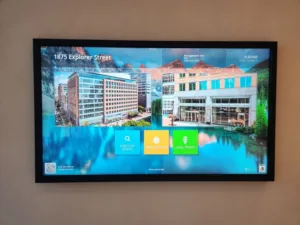
Old, printed signs are frustrating to update. Every time a tenant moves in or out, someone must order new letters or print new papers. Modern tenant directory boards solve this problem entirely. They use digital screens to show tenant names, floor numbers, and maps.
But these screens do much more than just list names. They act as a central information hub for your building. You can use them to display important building announcements, show the local weather, or share live transit schedules.
Features That Make Digital Directories Feel So Effortless
When you look at different digital directory board features, you’ll notice how easy they make managing a building. The software does heavy lifting for you. Here are some of the benefits you can expect:
- Remote Updating – You can change tenant names from your home or office computer. You don’t have to touch the physical screen to update the list.
- Interactive Maps – Touchscreens let visitors tap a name to see a map showing exactly how to get to that office.
- Custom Branding – You can add your building’s logo and colors to the screen, making the directory look like a natural part of your lobby design.
- Split-Screen Layouts – You can show the tenant list on one side of the screen and live news or building announcements on the other side.
- Accessibility Options – Good directories include features for users with disabilities, such as high-contrast text and buttons placed lower on the screen for wheelchair access.
Understanding What Goes into the Costs
Planning your budget requires a clear look at digital directory board costs. The total price is rarely just the cost of the screen itself. Touchscreen directory pricing depends on factors including:
- Hardware – This is the physical screen and the computer that runs it. Larger screens and touch-enabled screens cost more than smaller, non-touch screens.
- Enclosures – You need a frame or kiosk to hold the screen securely. A custom-built wooden or metal enclosure will add to your total cost.
- Software Licensing – Most digital directories require a monthly or yearly software fee. This fee covers the program you use to update the names and keeps the system running smoothly.
- Installation – You’ll need professionals to mount the screen to the wall, run power cables, and securely connect it to the internet.
- Support and Warranty – Paying for a good warranty and customer support plan ensures your screen gets fixed quickly if something breaks.
Comparing Directory Options So You Know What Fits Your Space
A careful directory signage comparison is the best way to find the right fit. Commercial directory displays come in many different shapes and sizes to match your specific lobby.
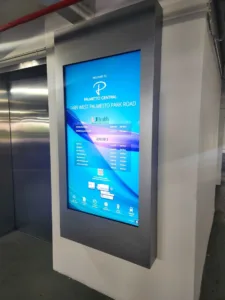
- Wall-mounted screens are very popular because they sit flat against the wall, saving floor space. These are great for smaller lobbies or narrow hallways.
- Freestanding kiosks stand on their own base. You can place them in the middle of a large lobby so that people can see them from all sides.
- Some buildings even use multiple screens placed side by side to create a massive video wall that catches everyone’s eye as they walk through the front doors.
Best Practices to Get the Most Value from Your Directory
Getting the most out of your investment means using it wisely. Follow these best practices to ensure your directory stays helpful and looks great for years:
- Keep It Updated – Update the tenant list on the exact day a new company moves in or out. A directory with wrong information is worse than no directory at all.
- Use Clear Fonts – Pick a simple font that’s easy to read from a few feet away. Avoid fancy or cursive letters.
- Limit Clutter – Don’t put too many widgets or news tickers on the screen. The main goal is to help people find tenants quickly.
- Clean the Screen – Touchscreens get dirty from people tapping them all day. Wipe the screen down daily with a safe, streak-free cleaner.
- Check the Connection – Ensure your internet connection is strong so that your screen never goes blank during business hours.
How to Choose a Directory That Works for Your Building
Selecting the right building directory display takes planning. Start by measuring your lobby. You want a screen that’s large enough to read easily, but not so large that it overwhelms the room.
Think about your tenants and visitors. If you have hundreds of tenants, a touchscreen is usually best so visitors can search for a tenant by name using an on-screen keyboard. If you have only 10 tenants, a standard screen without touch features might be perfectly fine. Always consider the lighting in your lobby, too. If your lobby gets a lot of sunlight, you’ll need a screen with high brightness to prevent annoying glare.
Contact TouchSource for Digital Directory Boards Today
Upgrading your lobby with a new digital directory makes your building look professional and helps visitors feel welcome. TouchSource is ready to help you find the perfect system for your space and your budget, so contact us today to request a quote.